

Introduction
The iPad has evolved far beyond its original role as a media consumption device. Today, it serves as a productivity tool, creative workstation, educational companion, and entertainment hub for millions of users worldwide. As tablets continue to become more powerful, the demand for accessories that enhance their capabilities has grown significantly. Among these accessories, keyboard cases remain one of the most popular choices because they help transform a tablet into a device capable of handling serious work.
Logitech has long been recognized as one of the leading manufacturers of computer and tablet accessories, and its latest innovation, the Logitech Flip Folio, takes a fresh approach to the traditional keyboard case. Instead of permanently attaching the keyboard to the case, Logitech has created a modular design that gives users greater flexibility. The result is an accessory that feels modern, practical, and perfectly suited to the way people use their iPads today.
What Is the Logitech Flip Folio?
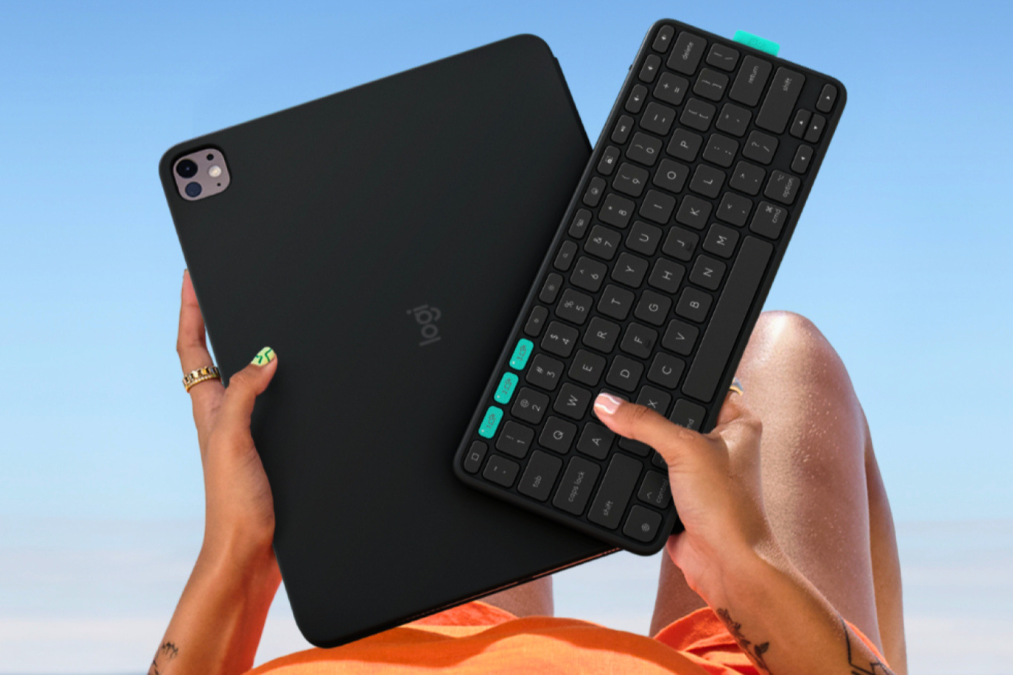
The Logitech Flip Folio is a premium keyboard case designed for compatible iPad Air and iPad Pro models. Unlike many keyboard cases currently available on the market, the Flip Folio features a detachable Bluetooth keyboard that can be removed whenever needed. The keyboard attaches magnetically to the back of the folio for storage, creating a clean and portable package when traveling.
This innovative design allows users to separate the keyboard from the display, creating a more flexible workspace. Whether typing a report, attending a virtual meeting, reading an article, or watching a movie, users can position the keyboard and tablet independently. This freedom helps make the iPad feel more adaptable while maintaining the convenience of an all-in-one accessory.
A New Approach to Tablet Productivity
Most keyboard cases attempt to transform the iPad into a laptop. While this concept works well for certain users, it can sometimes limit the flexibility that makes tablets so appealing in the first place. Logitech has approached the challenge differently by embracing the strengths of the iPad rather than trying to replicate a traditional notebook computer.
The detachable nature of the Flip Folio allows users to create a workspace that suits their individual preferences. Instead of being restricted by a fixed keyboard position, users can place the keyboard wherever it feels most comfortable while positioning the screen at an ideal viewing distance. This creates a more natural and ergonomic working environment, especially during longer typing sessions.
The Detachable Keyboard Experience
The standout feature of the Logitech Flip Folio is undoubtedly its wireless keyboard. Logitech has extensive experience designing keyboards, and that expertise is evident in the overall typing experience. The keyboard provides responsive keys, comfortable spacing, and a familiar layout that makes typing feel natural from the moment users begin using it.
Because the keyboard connects through Bluetooth, there are no physical limitations regarding placement. Users can sit back and position the iPad farther away for comfortable viewing while keeping the keyboard within easy reach. This flexibility makes a noticeable difference compared to traditional keyboard cases, where the screen and keyboard remain permanently connected.
When typing is complete, the keyboard can simply be attached to the back of the folio using the built-in magnetic storage system. This thoughtful design keeps everything organized and reduces the likelihood of misplacing the keyboard during travel.
Designed for Portability
Portability is one of the key reasons many people choose an iPad over a laptop. Unfortunately, some keyboard cases add considerable weight and bulk, reducing the convenience of carrying a tablet. Logitech has addressed this issue by creating a design that remains compact while still offering a full typing experience.
The Flip Folio is particularly appealing to students, business travelers, and remote workers who frequently move between different locations. Whether commuting to work, attending classes, or traveling internationally, users can carry the keyboard and protective case together without adding unnecessary complexity to their setup.
The magnetic storage system contributes significantly to this portability. Rather than requiring a separate carrying pouch or bag compartment, the keyboard remains securely attached to the folio whenever it is not in use.
Protection for Everyday Use
In addition to improving productivity, the Logitech Flip Folio also serves as a protective case. Modern tablets are significant investments, and protecting them from scratches, bumps, and everyday wear is an important consideration for most users.
The folio design covers both the front and back of the device, helping shield it from common hazards encountered during daily use. Whether the iPad is being transported in a backpack, briefcase, or travel bag, the case provides an extra layer of protection that can help maintain the device’s appearance over time.
This combination of productivity and protection makes the Flip Folio a practical accessory rather than simply an optional convenience.
Flexible Viewing Angles
Another major advantage of the Logitech Flip Folio is its integrated stand system. The ability to adjust viewing angles can significantly improve comfort during extended usage sessions.
Whether participating in a video conference, watching a movie, reading documents, or sketching with an Apple Pencil, users can position the iPad at an angle that feels natural. Because the keyboard operates independently, users are free to optimize both keyboard placement and screen position separately.
This flexibility allows the iPad to adapt to different tasks throughout the day, creating a more comfortable overall experience.
Support for Portrait and Landscape Modes
Many keyboard accessories focus primarily on landscape orientation. While landscape mode is ideal for typing and multitasking, portrait mode remains popular for reading, browsing websites, reviewing documents, and using social media applications.
The Logitech Flip Folio supports both orientations, giving users the freedom to choose the layout that best suits their needs. This versatility reinforces the product’s focus on adaptability and ensures that the iPad remains useful across a wide variety of scenarios.
Multi-Device Connectivity
Today’s users often work across multiple devices. A typical setup might include an iPad, smartphone, laptop, and desktop computer. Logitech has addressed this reality by including multi-device Bluetooth support in the Flip Folio keyboard.
Users can pair the keyboard with multiple devices and switch between them quickly using dedicated controls. This capability eliminates the need to carry separate keyboards and allows for a more streamlined workflow.
For professionals who regularly move between devices, this feature can save time and improve overall efficiency.
Battery Life and Reliability
Wireless accessories are only useful when they are ready to work, and Logitech has a strong reputation for dependable battery performance. The Flip Folio uses replaceable batteries designed to provide exceptionally long usage periods under normal conditions.
The extended battery life reduces maintenance requirements and minimizes interruptions. Users can focus on their work without constantly worrying about charging cables or low battery notifications.
This reliability is one of the reasons Logitech products remain popular among professionals and everyday consumers alike.
Who Should Consider the Logitech Flip Folio?
The Logitech Flip Folio is an excellent choice for users who value flexibility. Students can use it for note-taking and studying, professionals can create mobile workstations, and travelers can enjoy a lightweight productivity setup while on the move.
It is particularly appealing to people who switch frequently between typing and touch-based activities. Rather than forcing users into a laptop-style experience, the Flip Folio allows the iPad to remain a tablet whenever desired.
Users who prioritize adaptability, portability, and convenience will likely appreciate the unique benefits this accessory offers.
Final Thoughts
The Logitech Flip Folio represents a thoughtful reimagining of the traditional keyboard case. By introducing a detachable keyboard, flexible stand system, multi-device connectivity, and reliable protection, Logitech has created an accessory that feels perfectly aligned with the modern iPad experience.
Instead of attempting to turn the iPad into a laptop, the Flip Folio embraces what makes the tablet unique. This design philosophy results in a product that feels more versatile, more comfortable, and ultimately more useful for a wide range of users.
For anyone seeking a keyboard case that prioritizes freedom, flexibility, and everyday practicality, the Logitech Flip Folio stands out as one of the most compelling options currently available.
FAQs logitech flip folio
Q: What is the Logitech Flip Folio?
A: The Logitech Flip Folio is a keyboard case for select iPad models that combines a protective folio, adjustable stand, and detachable Bluetooth keyboard.
Q: What makes the Logitech Flip Folio different from other keyboard cases?
A: The Logitech Flip Folio features a removable keyboard that can be detached and stored magnetically on the back of the case, offering greater flexibility than traditional keyboard cases.
Q: Does the Logitech Flip Folio support multiple devices?
A: Yes, the Logitech Flip Folio keyboard can connect to multiple Bluetooth devices, allowing users to switch between an iPad, smartphone, and computer.
Q: Is the Logitech Flip Folio good for travel?
A: Yes, the Logitech Flip Folio is designed for portability, with a slim protective case and a detachable keyboard that stores neatly when not in use.
Q: Does the Logitech Flip Folio include a trackpad?
A: No, the Logitech Flip Folio does not have a built-in trackpad. It focuses on providing a flexible typing experience through its detachable Bluetooth keyboard.